The Serpkai Read API gives you your data in JSON or CSV to combine with whatever you want: your BI, your CRM or a script. It works with all the data from the Serpkai rank tracker and from Search Console.
In short
- Authentication with a token in the Authorization: Bearer header.
- Routes for projects, keywords, rises and drops, Search Console and AI visibility.
- Add ?format=csv to receive CSV.
- Read-only, 5,000 calls a day. Available from the Pro plan.
Before you start
| Requirement | Detail |
|---|---|
| Plan | Pro or higher |
| Token | You create it in Integrations › REST API |
| Time | 5 minutes for the first call |
Step 1: create your token
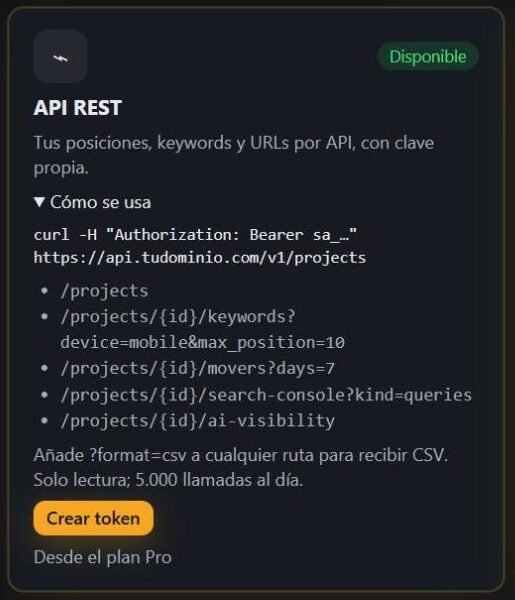
In Integrations, on the REST API card, click Create token. The token is only shown once: save it and don’t share it. On the same card you will see your account’s base URL.
Step 2: make your first call
Send the token in the Authorization:
curl -H "Authorization: Bearer sa_YOUR_TOKEN" \
  "YOUR_CARD_BASE_URL/v1/projects/PROJECT_ID/keywords?device=mobile&max_position=10"
Available routes
| Route | What it returns | Parameters |
|---|---|---|
/v1/projects | Your projects | — |
/v1/projects/{id}/keywords | Keywords with their position | device, max_position |
/v1/projects/{id}/movers | The biggest risers and fallers | days (default 7) |
/v1/projects/{id}/search-console | Search Console data | kind: queries, pages, cannibal, ctr_drops or movers |
/v1/projects/{id}/ai-visibility | AI visibility | — |
Add format=csv to any route to receive CSV instead of JSON.
Usage ideas
- Load your rankings into BigQuery or your database every day.
- Combine keywords with sales in your BI.
- Generate your own branded reports.
- If you prefer to receive changes rather than query them, use the webhooks.
Common errors and how to fix them
| Problem | Likely cause | Solution |
|---|---|---|
| 401 Unauthorized | The token is missing or incorrect | Check the Authorization: Bearer sa_… header |
| 404 Route not found | Misspelled route | Start with /v1/projects and copy the project id |
| 429 or limit reached | You have exceeded 5,000 calls a day | Cache the results and space out the calls |
| My token leaked | Someone else can read your data | Generate a new one on the card: the previous one stops working |
Good practices
- Store the token in environment variables, never in the repository code.
- Request only the data you need with max_position and days.
- Schedule queries after the daily check to get fresh data.
No card · No commitment
Frequently asked questions
Can I write or change data via the API?
No. The Serpkai API is read-only.
What do I do if my token leaks?
Generate a new one from the Integrations card: the previous one stops working immediately.
Is there a call limit?
Yes, 5,000 calls a day per account.
From which plan is it available?
From the Pro plan.
Does the API return historical data?
It returns the current position and the one from 7 days ago, plus the rises and drops for the period you set with days. To keep a full history, query the API every day or use the webhooks.
You might also like
Try it with your website
Create your account and connect your SEO data with your tools via API.
Start freeSee plans