What if, instead of opening tables, you could ask “which keywords dropped this week and why?” and get the answer with your real data? That is what the Serpkai MCP connector does: it connects Claude to your account in read-only mode, so it answers with your rankings, your Search Console and your AI visibility. It is included from the Free plan.
In short
- MCP (Model Context Protocol) is the standard that lets Claude query external tools.
- You create your personal URL in Serpkai and add it in Claude as a custom connector.
- Claude can only read: it cannot delete or change anything in your account.
- Included from the Free plan.
What MCP is and why it matters for SEO
The Model Context Protocol is an open standard that lets an AI assistant use third-party tools securely. Instead of copying an export and pasting it into the chat, Claude reads your data directly when you ask a question.
For SEO it means answers with real figures, instantly and with no manual work: drop analysis, summaries for a client or content ideas based on what already ranks.
Before you start
| Requirement | Detail |
|---|---|
| Serpkai plan | Any, including Free |
| Claude | An account that allows adding custom connectors (depends on your Claude plan) |
| Time | About 3 minutes |
Step 1: create your connector in Serpkai
- Open Integrations in the dashboard.
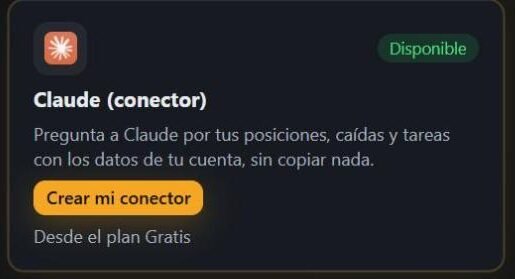
- On the Claude card, click Create my connector.
- Copy the URL that appears. It is only shown once and gives read access to your data: keep it somewhere safe.
Step 2: add it in Claude
- In Claude, open Settings › Connectors.
- Click Add custom connector.
- Paste your Serpkai URL and save.
- Open a new chat and ask about your data.
What data Claude can read
| Tool | What it returns |
|---|---|
| Projects | Your websites with their country, language and number of keywords |
| Keywords | Current position, the one 7 days ago, volume, ranking URL, CPC and estimated value in euros |
| Rises and drops | The keywords rising and falling the most in recent days |
| Search Console | Saved queries, pages, cannibalisations and CTR drops |
| AI visibility | Whether ChatGPT, Gemini or Perplexity name your brand, in what position and with which competitors |
| Other analyses | The project’s saved reports |
Question ideas to get started
- “Which keywords have entered the Top 3 this month on my website?”
- “Which pages are losing the most positions on mobile and what do they have in common?”
- “Give me a summary of what changed this week to send to my client.”
- “For which queries do AI assistants mention me, and for which do they name a competitor and not me?”
- “With the keywords between positions 4 and 10, which content should I improve first?”
Tip
- Always ask it to cite the figures it uses: that way you can quickly check the answer is based on your data.
- To compare periods, give the number of days: “in the last 14 days”.
Common errors and how to fix them
| Problem | Likely cause | Solution |
|---|---|---|
| Claude can’t find the connector | The URL was pasted incomplete | Generate a new URL on the card and paste it in full |
| I have lost the URL | It is only shown once for security | Click “Generate new URL”: the previous one stops working |
| I think someone else has my URL | The URL gives read access | Click “Revoke” and create another one |
| I can’t see the connectors option in Claude | It depends on your Claude plan | Check your plan in Claude or use the Serpkai API |
Good practices
- Treat the URL like a password: don’t share it or paste it into public documents.
- Combine it with the daily alerts: the alert tells you what happened and Claude helps you understand why.
- If you work with clients, create one project per client so answers don’t mix data.
No card · No commitment
Frequently asked questions
Can Claude delete or change my data?
No. The connector is read-only: Claude can read your data but cannot change or delete anything.
Does it work with ChatGPT or Gemini?
They are in the works. You can click “I’m interested” on their Integrations card and we will let you know.
Does it cost anything?
The connector is included from Serpkai’s Free plan. What you need in Claude depends on your Claude plan.
What happens if I revoke the connector?
The URL stops working immediately and Claude can no longer read your data until you create a new one.
Can I use the connector with several projects?
Yes. Claude can read every project in your account; just tell it which one you mean in your question.
You might also like
Try it with your website
Create your free account, add your website and ask Claude about your rankings today.
Start freeSee plans