If you have your own system (a CRM, an internal dashboard or a bot), Serpkai webhooks send you ranking changes as soon as they are calculated, without you having to ask. It is the most direct way to bring changes from the Serpkai rank tracker into your systems.
In short
- Every morning with changes you receive a POST with JSON (daily_summary event).
- Each delivery is signed with HMAC-SHA256 in the X-Serpkai-Signature header.
- Only public https URLs are accepted.
- Available from the Pro plan.
What you receive
A POST with Content-Type: application/json and these headers:
| Header | Content |
|---|---|
| X-Serpkai-Event | The event type: daily_summary o test |
| X-Serpkai-Signature | sha256= followed by the HMAC-SHA256 of the body with your secret |
| User-Agent | Serpkai-Webhooks/1.0 |
Sample body:
{
  "event": "daily_summary",
  "date": "2026-11-20",
  "device": "mobile",
  "project": {
    "id": "abc123",
    "name": "My shop",
    "domain": "yoursite.com"
  },
  "up": [
    {
      "keyword": "trail running shoes",
      "before": 8,
      "now": 4
    }
  ],
  "down": [],
  "entered_top3": [],
  "left_top3": [],
  "entered_top10": [
    "women’s running shoes"
  ],
  "left_top10": [],
  "counts": {
    "up": 1,
    "down": 0,
    "entered_top3": 0,
    "left_top3": 0,
    "entered_top10": 1,
    "left_top10": 0
  },
  "id": "2026-11-20-abc123-daily_summary",
  "url": "https://…/#/p/abc123"
}
Before you start
| Requirement | Detail |
|---|---|
| Plan | Pro or higher |
| Endpoint | A public https URL that accepts POST and responds 2xx |
| Time | 10 to 30 minutes, depending on your system |
Step by step
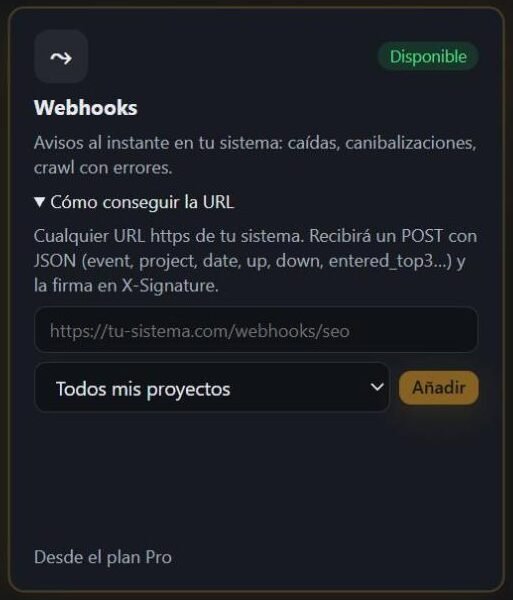
- In Integrations, on the Webhooks card, paste your URL.
- Choose all your projects or a specific one and click Add.
- Save the secret that appears: it is only shown once.
- Click Send test: you will receive a
test.
Verify the signature
Before trusting the message, calculate the HMAC-SHA256 of the raw body with your secret and compare it with the header:
// Node.js: verify the Serpkai webhook signature
const crypto = require("crypto");
function validSignature(rawBody, header, secret) {
  const expected = "sha256=" + crypto.createHmac("sha256", secret).update(rawBody).digest("hex");
  return header.length === expected.length &&
    crypto.timingSafeEqual(Buffer.from(header), Buffer.from(expected));
}
Important
- Calculate the signature on the raw body, before parsing it as JSON.
- Use the
idfield to avoid processing the same delivery twice. - Respond quickly with a 2xx and process in the background if your logic is slow.
Usage ideas
- Create a task in your task manager when an important keyword leaves the Top 3.
- Store the daily history in your own database or in BigQuery.
- Alert in your own bot or internal app.
- If you prefer to query rather than receive, use the Read API.
Common errors and how to fix them
| Problem | Likely cause | Solution |
|---|---|---|
| Nothing arrives | The URL is not public or not https | Use an https URL reachable from the internet |
| The signature doesn’t match | It is calculated on the already parsed JSON | Calculate it on the raw body, exactly as it arrives |
| The destination appears paused | Several deliveries in a row failed | Fix the endpoint and click “Send test” to reactivate it |
| I have lost the secret | It is only shown once | Delete the destination and create it again |
Good practices
- Store the secret in a secrets manager, never in the code.
- Log the deliveries you receive with their id so you can debug.
- Start with a test endpoint and move to production once the signature validates.
No card · No commitment
Frequently asked questions
What happens if my server fails?
If deliveries fail several times in a row, the destination is paused. Once you fix it, send a test to reactivate it.
Can I use an internal or local network URL?
No. For security, only public https URLs are accepted.
How often is it sent?
Once a day, in the morning, when there are changes. The test event is sent when you click “Send test”.
From which plan is it available?
From the Pro plan.
Can I filter which projects the webhook sends?
Yes. When adding the destination you choose all your projects or a specific one, and you can create several destinations with different projects.
You might also like
Try it with your website
Create your account and connect your rankings with your own system.
Start freeSee plans